Node Modules Cleaner app icon

Free desktop app · Windows, macOS, Linux

Get back the gigabytes node_modules ate

One scan with Node Modules Cleaner turns up your node_modules folders, merged Git worktrees and the shared developer caches behind them, and tells you how much space a delete actually frees, not just how big the files look on paper.

Open source under the MIT license · React + Rust (Tauri 2)

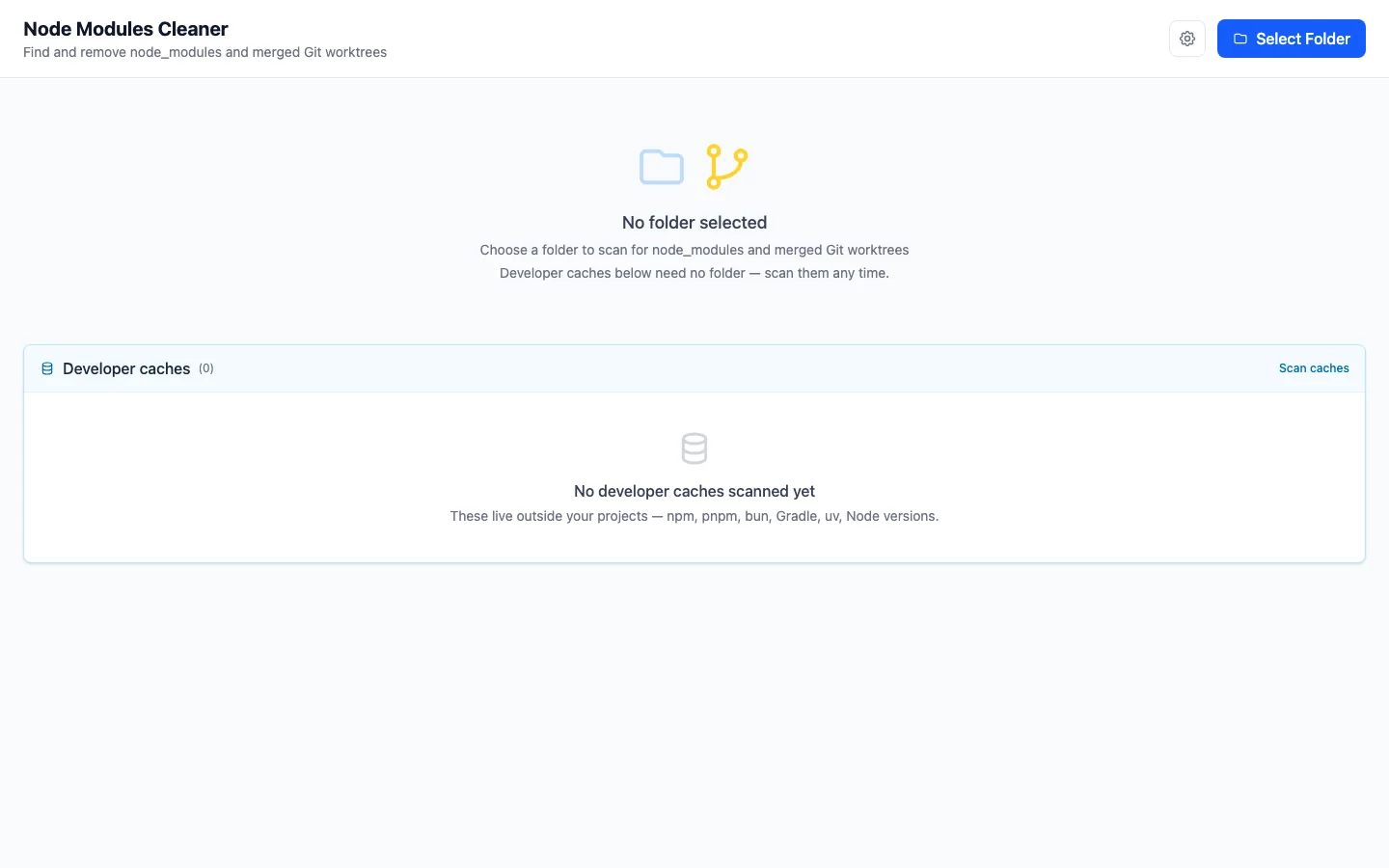
The main window after scanning a Projects folder: nine node_modules folders tagged with their package manager (npm, yarn, pnpm, bun), detected technologies and reclaimable size; four are selected, with 6.8 GB to free shown at the bottom.

Your disk fills up on its own

Every JavaScript project carries its own node_modules, every branch you open with git worktree is another full checkout, and package managers keep their caches outside your projects entirely. Give it a few months and that adds up to tens of gigabytes nobody is watching.

node_modules

Left behind in projects you haven't opened in months. npm install brings them back when you return.

Merged worktrees

The branch landed in main long ago, yet its working directory and dependencies are still on disk.

Tool caches

npm, pnpm, bun, yarn, uv, Gradle, old puppeteer browsers and Node versions under nvm, all living outside your projects.

Why “folder size” often lies
Case What naive sizing reports What you actually get back
node_modules under pnpm or bun the full size of every file close to nothing: the files are hardlinks into a shared store, and the data survives the delete
Sparse files (VM disk images) the nominal size, sometimes hundreds of GB only the blocks that were really written
Cloud-evicted files (iCloud Drive) the nominal size nothing, because the bytes aren't on this machine

What it does

One window, three panels, and a single confirmation before anything is deleted.

node_modules

Fast scans, honest sizes

Point it at a folder such as ~/Projects and Rust walks it in parallel with Rayon.

  • Each row shows what a delete actually frees, with the nominal size beside it when the two differ.
  • The package manager is detected from the lock file: npm, yarn, pnpm or bun.
  • Technologies from package.json appear as badges: next, react, expo, @nestjs, vue, astro and more.
  • Sort by name, size or package manager; select rows one by one or all at once.
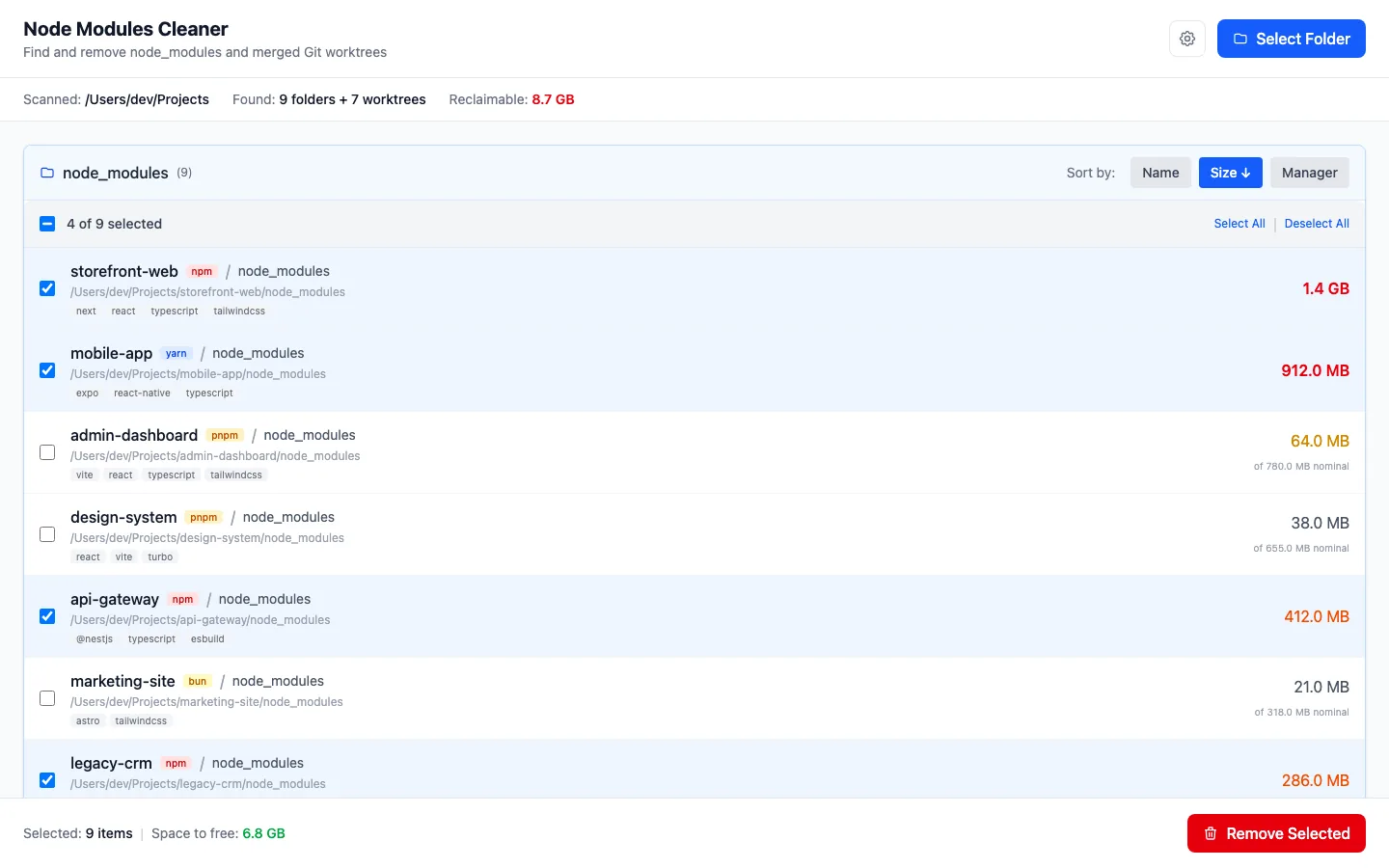
The node_modules panel sorted by size. Projects on pnpm and bun show a small reclaimable size with a larger nominal size beside it.
Git worktrees

Merged worktrees, squash merges included

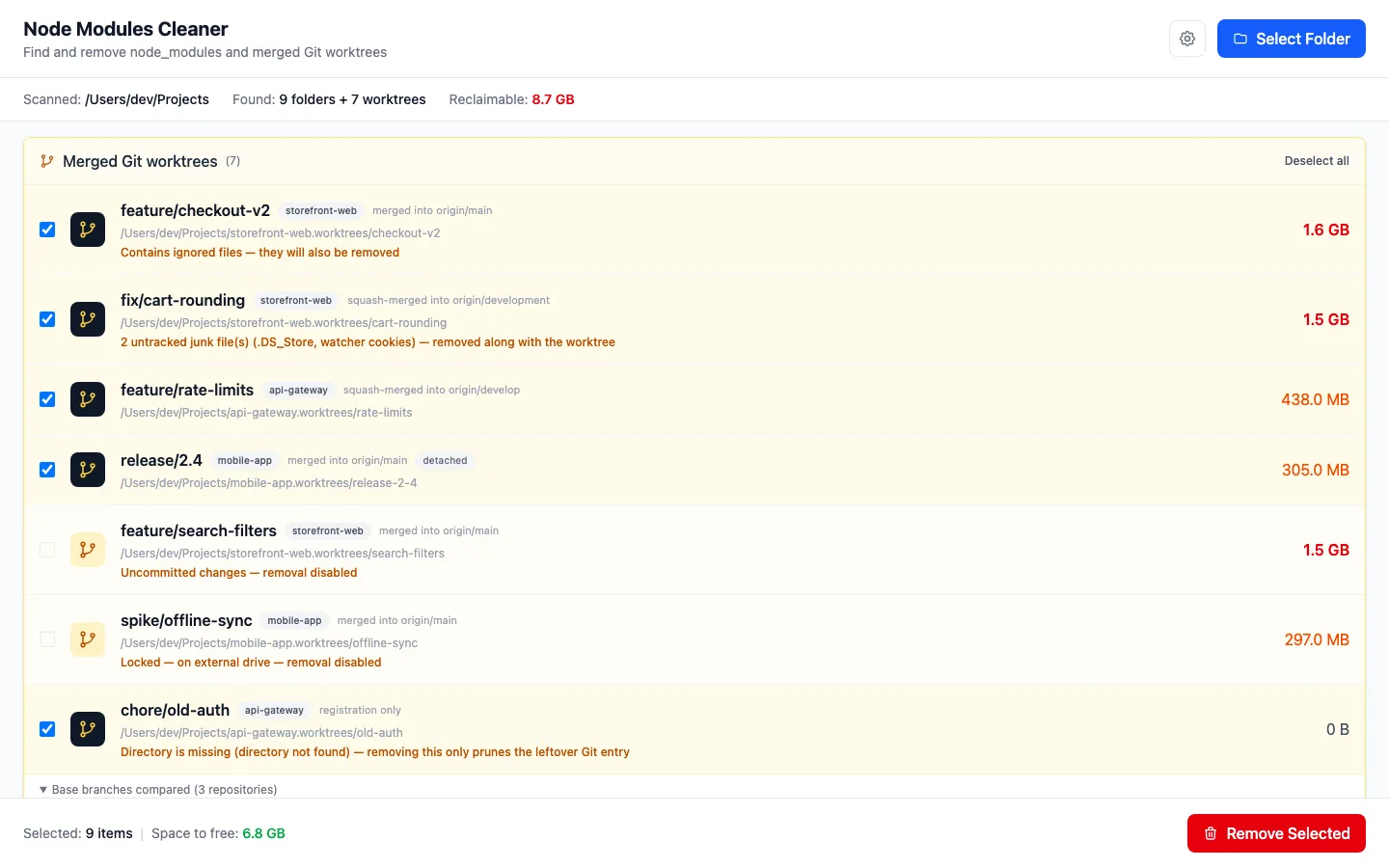
The app refreshes remote-tracking refs first, then compares every worktree against all of the repository's base branches: origin/HEAD, main, master, development and develop.

  • Recognises squash merges, GitHub's default, without leaving objects behind in the repository.
  • Worktrees with uncommitted changes, or locked by Git, are protected and can't be selected.
  • Entries whose directory is already gone are cleared with git worktree prune.
  • Branches are kept. Only the working directory goes.
The Merged Git worktrees panel: branches merged and squash-merged into origin/main, origin/development and origin/develop; a worktree with uncommitted changes and a locked one are greyed out; the compared base branches are listed at the bottom.
Developer caches

Caches outside your projects, no folder needed

These caches live at fixed locations, so you can scan them the moment the app opens.

  • npm (_cacache, _npx), bun, yarn Berry and Classic, old Gradle versions, superseded puppeteer builds, old Node versions under nvm.
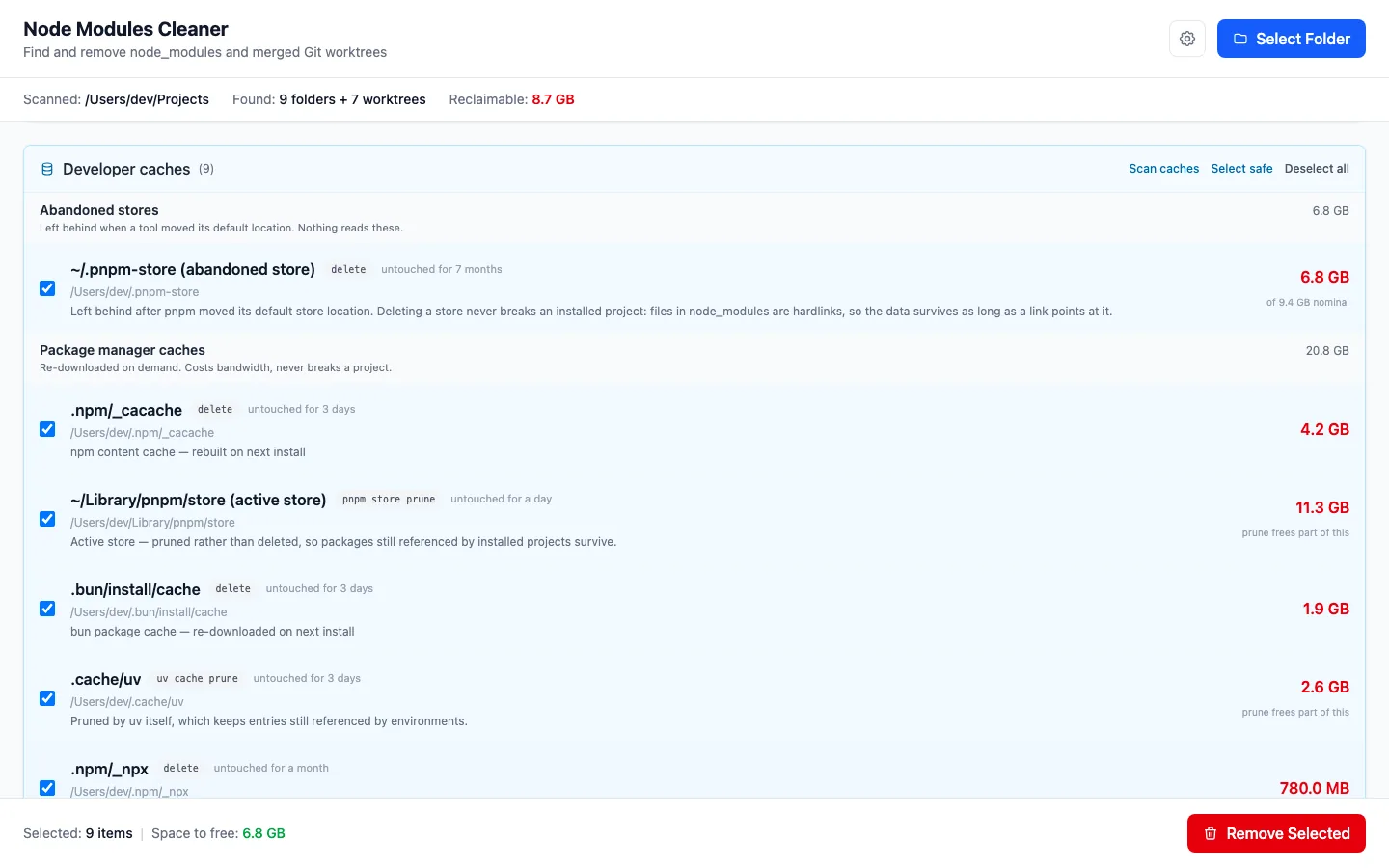
  • Abandoned pnpm stores left behind when pnpm moved its default location, told apart from the store it uses today.
  • The active pnpm store and the uv cache are handed to their own prune, so whatever is still in use stays.
  • Homebrew logs are emptied in place, because deleting a file a service holds open would not free the space.
  • Select safe picks only the safe entries. Anything that needs review is a deliberate click.
The Developer caches panel grouped into abandoned stores and package manager caches. Each entry shows its cleanup method (delete, pnpm store prune, uv cache prune), how long it has been untouched, and its size.
Safety

One confirmation, with a summary

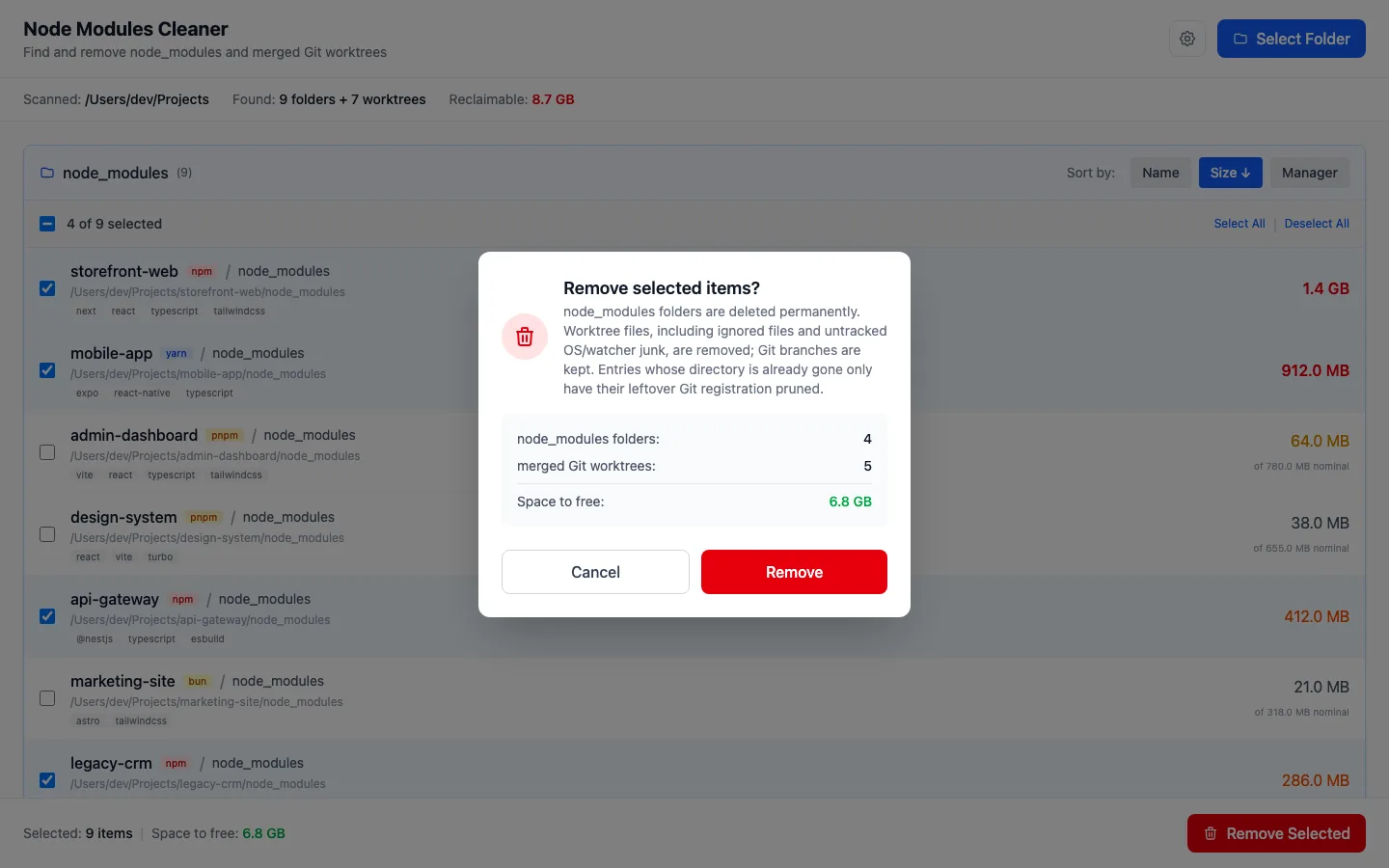
Selected node_modules folders and worktrees go together, after a single confirmation that tells you how many of each you're removing and how much space comes back.

  • Removal is refused if a worktree gained a commit after the scan.
  • OS and watcher junk (.DS_Store, watchman cookies) is reported separately: it isn't work, even though it makes git worktree remove refuse.
  • A worktree locked by Git is never force-removed.
The “Remove selected items?” confirmation: 4 node_modules folders, 5 merged worktrees, 6.8 GB to free, with Cancel and Remove buttons.
Menu bar

Runs quietly from the menu bar

Close the window and the app stays in the menu bar. For each watched folder it shows the free space on the volume that folder actually lives on, and how many worktrees are ready to remove.

  • Refreshes every 15 minutes, on Refresh now, and after every cleanup.
  • The background refresh never touches the network and never crawls node_modules.
  • On macOS you can hide the Dock icon.
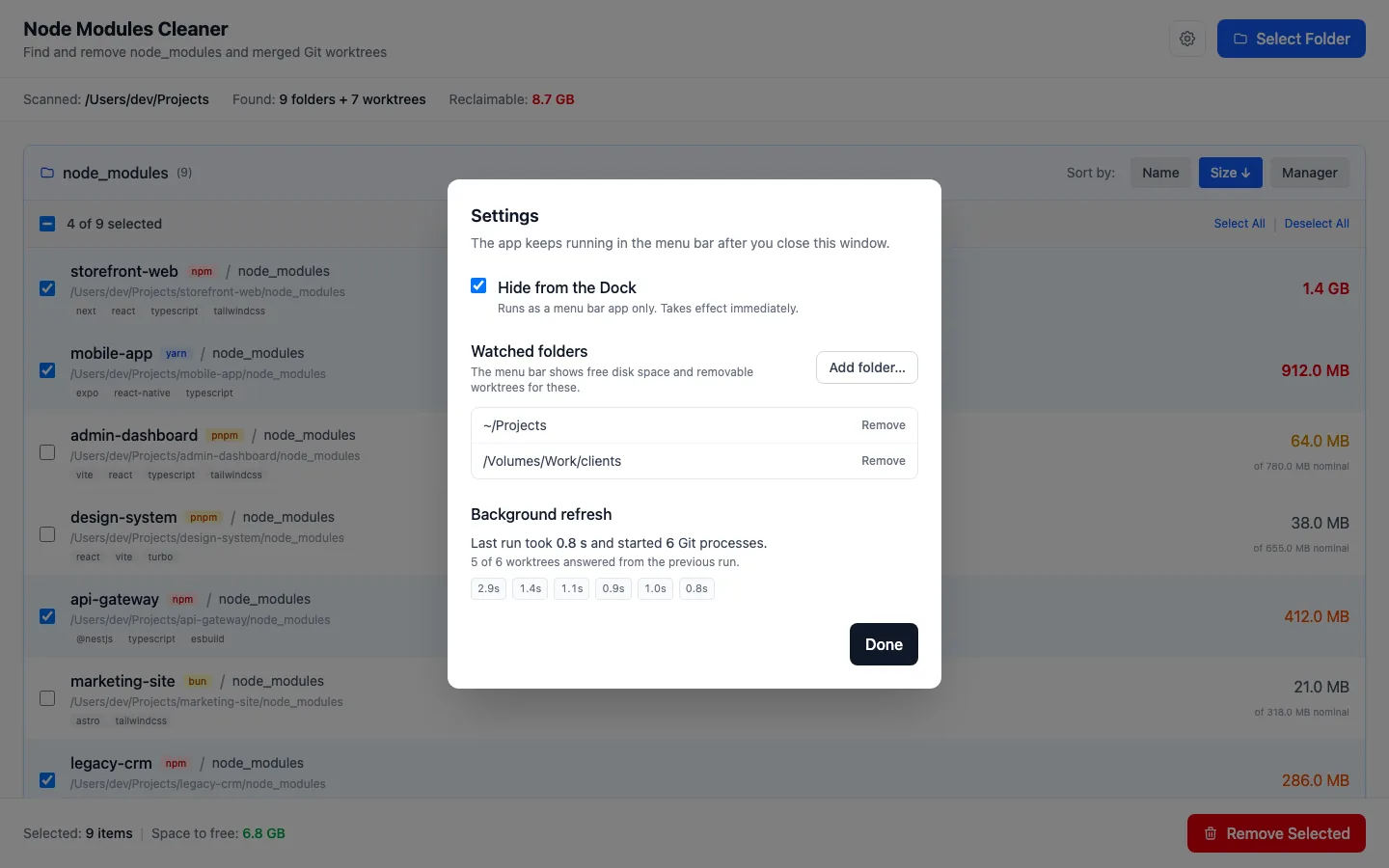
  • Settings show how long the last refresh took and how many Git processes it started.
The Settings panel: Hide from the Dock is checked, two folders are watched, and the Background refresh section lists recent refresh times.

How it works

From picking a folder to free space in four steps.

  1. Pick a folder

    Click Select Folder and choose the directory that holds your projects.

  2. Let it scan

    A single scan finds both node_modules folders and merged worktrees.

  3. Review the results

    node_modules comes first, worktrees below. Tick whatever you don't need.

  4. Remove the selection

    Click Remove Selected and confirm. Both panels are cleaned in one go.

Developer caches need no folder. Click Scan caches, go through the groups, and check how each entry will be cleaned: deleted, emptied in place, or handed to the owning tool's prune command.

Download or build from source

Ready-made installers are on GitHub Releases. You can also build the app yourself.

Installers

  • Windows.msi · x64
  • macOS.dmg · Apple Silicon and Intel
  • Linux.deb, .AppImage · x64

Go to the latest release

The app isn't code-signed:

  • macOS: right-click → Open to get past Gatekeeper.
  • Windows: click “More info” → “Run anyway”.
  • Linux: the tray needs libayatana-appindicator3 (the .deb declares it). Without it the app still starts, just without the tray.

Build from source

You'll need Node.js 18+, the latest stable Rust, and the Tauri system prerequisites.

git clone https://github.com/jash90/node-modules-cleaner.git
cd node-modules-cleaner
npm install
npm run tauri dev     # development mode
npm run tauri build   # installers in src-tauri/target/release/bundle/

System dependencies:

  • Linux: sudo apt install libwebkit2gtk-4.1-dev libappindicator3-dev librsvg2-dev patchelf
  • macOS: xcode-select --install
  • Windows: Visual Studio C++ Build Tools

Stack

  • Tauri 2
  • Rust
  • Rayon
  • React 19
  • TypeScript
  • Vite 7
  • Tailwind CSS 4