A macOS menu bar app

Your MRs, PRs and Jira issues. Always in view.

MR Jira Menu Bar keeps a live count in your menu bar: how many merge requests you have open, how many are ready to merge, and where your Jira issues stand — without switching to the browser.

Free · source on GitHub · macOS 13 Ventura or later · DMG installer · Polish-language interface

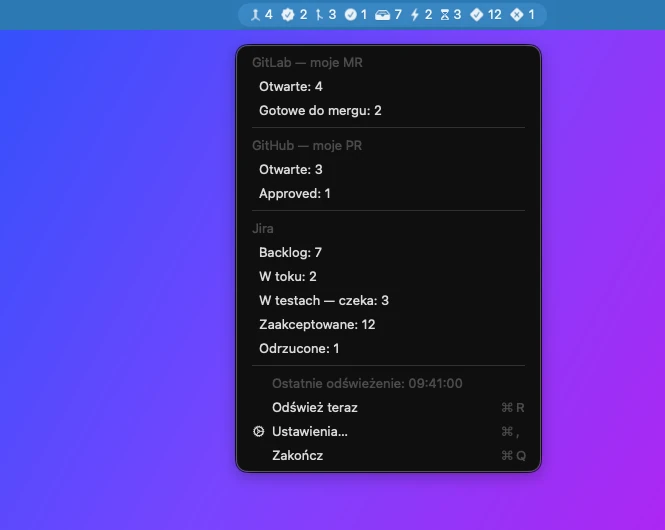
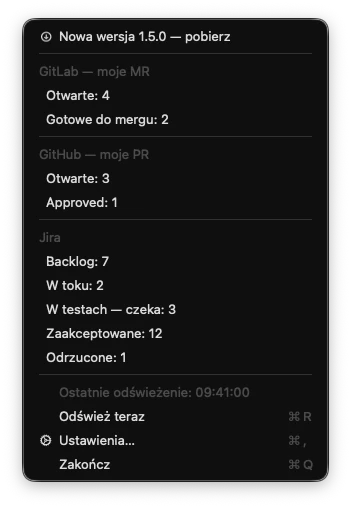
The macOS menu bar showing the app's counters with its menu open: GitLab — 4 open MRs, 2 ready to merge; GitHub — 3 open PRs, 1 approved; Jira — backlog 7, in progress 2, in testing 3, accepted 12, rejected 1. Menu labels are in Polish.

Your work status, scattered across three browser tabs

Code lives in GitLab or on GitHub, tasks live in Jira. Finding out whether something can be merged, or whether QA sent an issue back, means opening several tabs and clicking through filters.

Reviews that sit idle

Your merge request already has two approvals, but you won't know until you go and check GitLab yourself.

Issues that bounce back

A tester moved an issue back to “In Progress”. It's easy to miss — and even harder to keep track of how often it happens.

Constant context switching

Every “let me just check” pulls you out of your editor. A number in the menu bar answers the question at a glance.

What it does

The app runs in the background with no Dock icon. Every 5 minutes it fetches counts from the sources you've enabled and shows them in the menu bar.

Counters right in the menu bar

Each counter has its own icon, and hovering shows a one-line summary. Available counters:

  • GitLab — your open merge requests, and those ready to merge (at least 2 approvals).
  • GitHub — your open pull requests, and those that are approved.
  • Jira — backlog (“To Do” / “Backlog”), in progress, waiting in testing, accepted and rejected.
Menu bar counters: 4 open MRs, 2 ready to merge, 3 open PRs, 1 approved, backlog 7, in progress 2, in testing 3, accepted 12, rejected 1.

One click to the right list

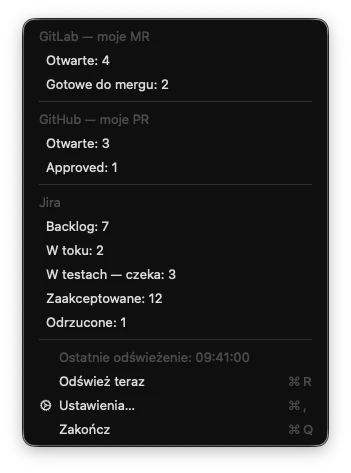
Clicking the icon opens a menu broken down by source. Every entry opens the matching view in your browser: your merge request dashboard in GitLab, a pull request search on GitHub, or a ready-made JQL filter in Jira.

The menu also shows when data was last refreshed. Press R to refresh immediately.

The app's open menu with GitLab, GitHub and Jira sections, the last refresh time, and Refresh now, Settings and Quit items (labels in Polish).

A rejection counter that sticks

“Rejected” counts every issue that has ever been sent back from testing — even if it was accepted later. An issue counts when:

  • you moved it to the “Internal testing” status,
  • the very next status change was back to “In Progress”, made by someone else,
  • with GitLab enabled: a merge request of yours that mentions the issue key was created before that bounce-back.

Status names (“To Do”, “Backlog”, “In Progress”, “Code review”, “Internal testing”) are hard-coded, so the app assumes this Jira workflow.

A trimmed-down menu bar with four counters: 4 open MRs, 2 ready to merge, 2 in progress, 1 rejected.

Show only what you need

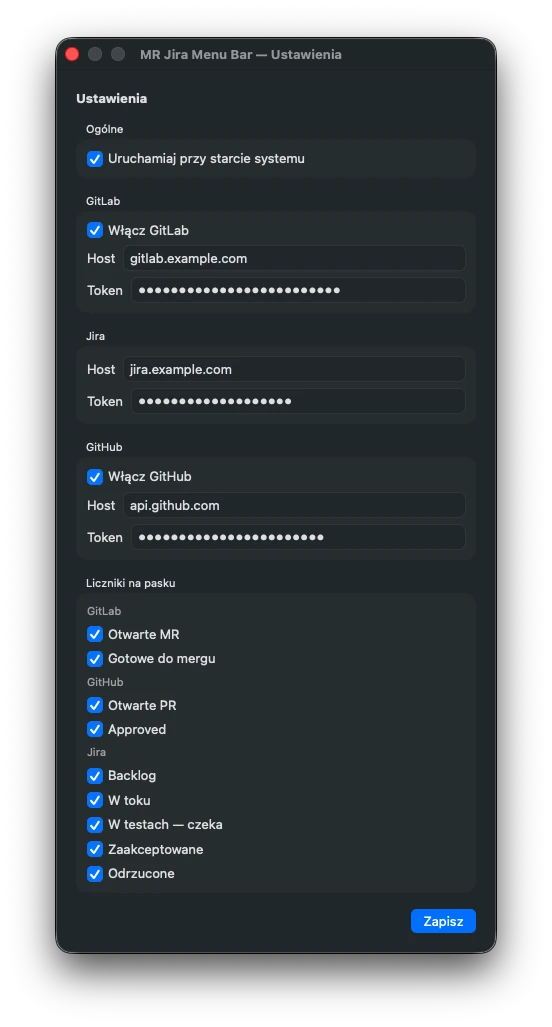
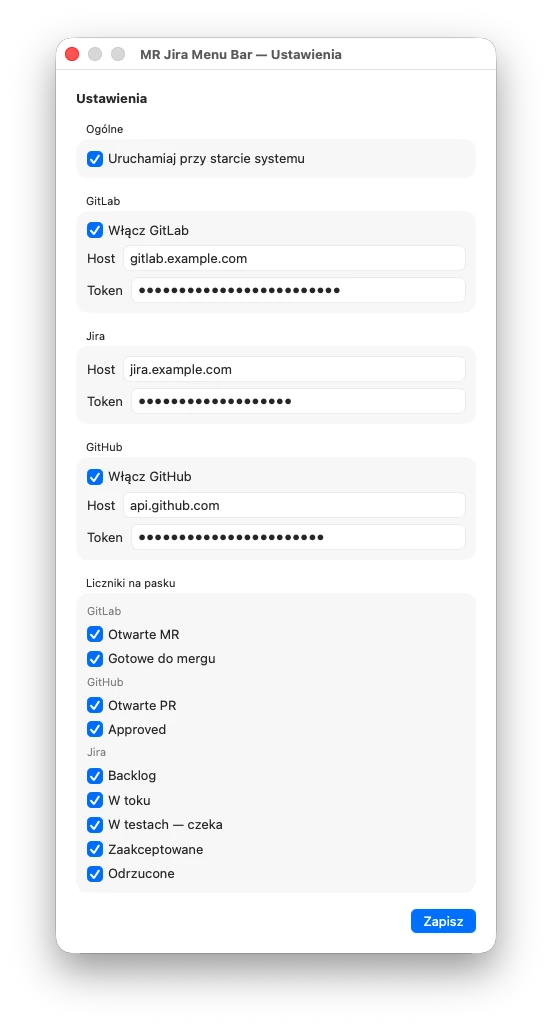
In Settings you enter a host and a token for each source. GitLab and GitHub can each be switched off with a single toggle, and any of the nine counters can be hidden from the menu bar — it still appears in the menu.

  • Works with self-hosted GitLab, GitHub.com, GitHub Enterprise, and Jira Server / Data Center (personal access token).
  • Tokens are stored in the macOS Keychain as a single encrypted item.
  • Optional “launch at login”.
The Settings window with General, GitLab, Jira, GitHub and menu bar counter sections. Hosts gitlab.example.com and jira.example.com, tokens masked. Labels in Polish.

Know right away when something breaks

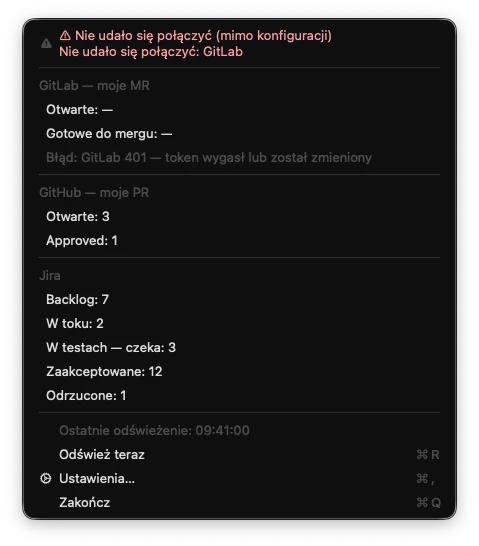
If a source is configured but can't be reached, its menu bar counters turn into a red warning symbol and a banner appears at the top of the menu. An expired token shows up as a clear 401 message.

The other sources keep working — one failing doesn't block the rest.

The menu bar with the GitLab counters replaced by red warning symbols and a dash. The menu with a red banner saying the connection failed despite valid configuration, and the error “GitLab 401 — token expired or changed” (in Polish).

Updates without the hunt

Every 6 hours the app checks the latest GitHub release. When a newer version is out, a “new version — download” item appears in the menu; it saves the DMG to your Downloads folder and opens it.

The menu with an extra item at the top announcing version 1.5.0 for download, with a down-arrow icon.

How it works

Three steps from download to your first counters.

  1. Install

    Download the DMG from the latest release and drag the app into Applications.

  2. Add hosts and tokens

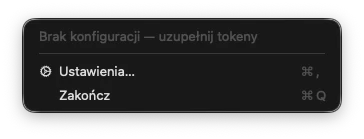
    On first launch a gear icon appears in the menu bar and Settings opens. Fill in at least one source and click “Zapisz” (Save).

  3. Glance at the menu bar

    Counters refresh every 5 minutes. Click the icon for details, or jump straight to the list in GitLab, GitHub or Jira.

The current release (v1.4.0) is not signed with a Developer ID certificate or notarized, so macOS will block the first launch. When that happens, open System Settings → Privacy & Security and click “Open Anyway” (on older macOS versions: right-click the app and choose “Open”).

For developers

A native Swift app with zero third-party dependencies. The logic is kept separate from the UI and covered by unit tests.

  • Swift 5.9
  • AppKit (NSStatusItem)
  • SwiftUI
  • Swift Package Manager
  • CryptoKit
  • ServiceManagement
  • XCTest
  • GitHub Actions

Run it locally

Requires macOS 13+ and Xcode (Swift 5.9+).

git clone https://github.com/jash90/mr-jira-menubar.git
cd mr-jira-menubar
swift run MRJiraMenuBar      # development mode
swift test                   # MenuBarCore tests
scripts/build-app.sh         # .app + DMG in dist/

There are no environment variables — hosts and tokens are entered in the Settings window. Quit from the menu ( Q).

Layout and APIs

Sources/MenuBarCore — Foundation-only logic (API clients, StatusStore, StatusFormatter, settings, updates). Sources/MRJiraMenuBar — the AppKit/SwiftUI interface.

SourceAPI and auth
GitLabREST API v4, PRIVATE-TOKEN header
GitHubSearch API, Bearer token; /api/v3 path for GitHub Enterprise
JiraREST API v2 (JQL search and changelog), PAT sent as Bearer

Releases are built by the release.yml workflow, which attaches the DMG to the GitHub release. Developer ID signing and notarization kick in when a certificate is present in the repository secrets — without one, the build is ad-hoc signed.